Introduction
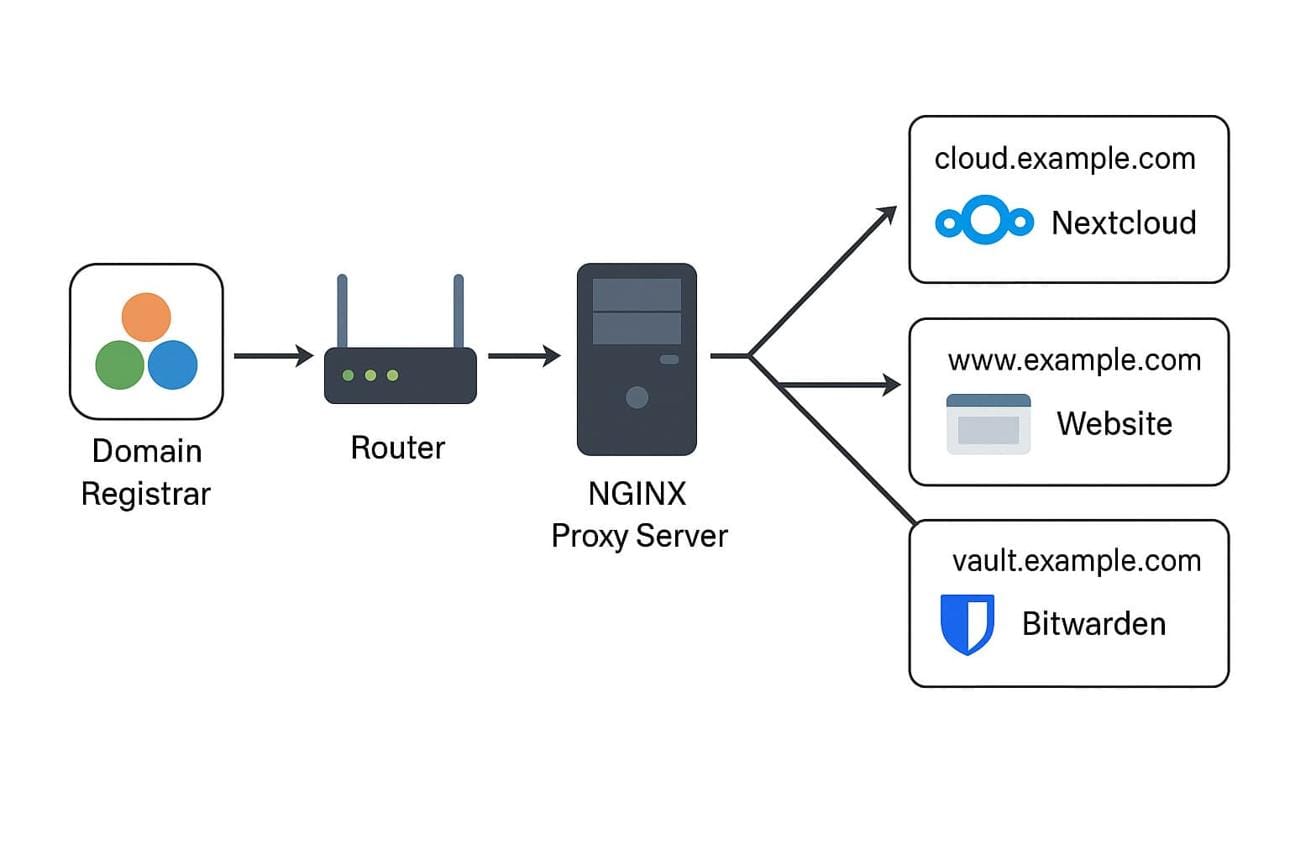
One of the biggest advantages of self-hosting Ghost is the ability to run multiple websites on the same VPS.
This is especially useful if you:
- build Ghost themes
- manage client websites
- run demo websites
- operate a Ghost marketplace
- test multiple projects
In my own workflow, I run multiple Ghost websites using:
- Docker
- Nginx reverse proxy
- subdomains
- isolated containers
- separate Ghost volumes
This setup gives:
- flexibility
- scalability
- lower hosting costs
- easier deployments
Why Use Subdomains?
Subdomains help organize projects cleanly.
Examples:
blog.yourdomain.com
magazine.yourdomain.com
demo.yourdomain.com
docs.yourdomain.com
For a Ghost marketplace, subdomains are extremely useful for:
- live theme demos
- documentation websites
- staging environments
- client previews
My Real Setup
I personally use a Contabo VPS with:
- multiple Ghost containers
- Docker Compose
- Nginx reverse proxy
- custom domains and subdomains
Each Ghost website usually has:
- its own container
- its own content volume
- its own port
- but sheared database and Nginx configuration
This keeps projects isolated and easier to maintain.
Basic Multi-Site Architecture
Example structure:
ghostheme.com               → Marketplace
blog-elvara.ghostheme.com  → Theme demo
blog-lumora.ghostheme.com  → Theme demo
saas-docs.ghostheme.com    → Theme demo
Each website runs independently inside Docker.
Step 1 — Create a Docker Compose File
Example:
version: "3.8"

services:
  ghost:
    image: ghost:latest
    container_name: ghost_blog_elvara

    restart: always

    ports:
      - "3045:2368"

    environment:
      url: https://blog-elvara.yourdomain.com

      database__client: mysql
      database__connection__host: mysql
      database__connection__user: root
      database__connection__password: strong_password
      database__connection__database: ghost_elvara

      NODE_ENV: production

    volumes:
      - elvara_content:/var/lib/ghost/content

    depends_on:
      - mysql

  mysql:
    image: mysql:8.0

    container_name: ghost_elvara_mysql

    restart: always

    environment:
      MYSQL_ROOT_PASSWORD: strong_password
      MYSQL_DATABASE: ghost_elvara

    volumes:
      - elvara_mysql_data:/var/lib/mysql

volumes:
  elvara_content:
  elvara_mysql_data:
Step 2 — Deploy the Website
Run:
docker compose up -dThen verify:
docker psYou should see:
- Ghost container
- MySQL container
running successfully.
Step 3 — Configure Nginx
all subdomain needs a global Nginx configuration.
Example:
# My Nginx Setup: One File for All Subdomains

Instead of creating a separate Nginx config file for every Ghost website, I use one Nginx file with a `map` block.

This allows me to route many domains and subdomains to different Docker ports from one place.

Example:

```nginx
map $host $backend_port {
    ghostheme.com                         3057;
    www.ghostheme.com                     3057;

    saas-docs.ghostheme.com               3043;

    blog-inkline.ghostheme.com            3044;
    blog-inkline-midnight.ghostheme.com   3044;
    blog-inkline-pearl.ghostheme.com      3044;

    blog-lumora.ghostheme.com             3046;
    blog-lumora-sage.ghostheme.com        3046;
    blog-lumora-dark.ghostheme.com        3046;

    blog-elvara.ghostheme.com             3045;
    blog-elvara-sage.ghostheme.com        3045;
    blog-elvara-dark.ghostheme.com        3045;

    blog-velora.ghostheme.com             3048;
    blog-velora-dark.ghostheme.com        3048;

    blog-novaryn.ghostheme.com            3049;
    blog-novaryn-midnight.ghostheme.com   3049;

    default                               3057;
}

server {
    server_name ghostheme.com www.ghostheme.com *.ghostheme.com;

    location / {
        proxy_pass http://127.0.0.1:$backend_port;

        proxy_http_version 1.1;
        proxy_set_header Upgrade $http_upgrade;
        proxy_set_header Connection 'upgrade';

        proxy_set_header Host $host;
        proxy_cache_bypass $http_upgrade;

        proxy_set_header X-Real-IP $remote_addr;
        proxy_set_header X-Forwarded-For $proxy_add_x_forwarded_for;
        proxy_set_header X-Forwarded-Proto $scheme;
    }

    client_max_body_size 50M;
}
This setup is very practical when running many Ghost websites on the same VPS.
For example:
blog-elvara.ghostheme.com  → port 3045
blog-lumora.ghostheme.com  → port 3046
blog-velora.ghostheme.com  → port 3048
saas-docs.ghostheme.com    → port 3043
Each Ghost site runs in Docker on its own port, and Nginx sends visitors to the correct container depending on the subdomain.
Why I Like This Approach
Using one Nginx file makes the setup easier to maintain because:
- all subdomains are managed in one place
- adding a new demo site only requires adding one line to the map
- I do not need many duplicated server blocks
- SSL configuration is centralized
- it works well with wildcard subdomains
For a Ghost marketplace with many theme demos, this is much cleaner than creating a separate file for every subdomain.
Important Note
After editing the Nginx file, always test the configuration:
sudo nginx -tIf everything is correct, reload Nginx:
sudo systemctl reload nginxStep 4 — Enable SSL
After configuring Nginx, install SSL certificates.
Example using Certbot:
sudo certbot --nginxSSL is extremely important for:
- Ghost memberships
- newsletters
- SEO
- browser security
Managing Multiple Ghost Websites
One thing I learned after running multiple Ghost websites is the importance of organization.
I usually create separate folders like:
/opt/ghost-elvara/
/opt/ghost-lumora/
/opt/ghost-inkline/
Each project contains:
- docker-compose file
- backups
- environment configs
- deployment scripts
This keeps everything easier to manage.
Docker Volume Strategy
I also prefer naming volumes explicitly:
volumes:
  elvara_content:
    name: elvara_content

  elvara_mysql_data:
    name: ghost_shared_mysql
This avoids:
- confusing Docker volume names
- accidental deletion
- deployment issues
Very useful for multi-site setups.
Backup Strategy
For backups, I usually archive Ghost content volumes:
docker run --rm \
  -v elvara_content:/source \
  -v /opt:/backup \
  alpine \
  tar czf /backup/elvara_content.tar.gz -C /source .
This makes migrations and recovery much easier.
Common Mistakes
1. Reusing the Same Port
Each Ghost site must use a unique port.
Wrong:
ports: - "2368:2368"for every site.
2. Incorrect Ghost URL
Always set the correct domain:
url: https://blog-elvara.yourdomain.comOtherwise:
- redirects break
- images fail
- admin issues appear
3. Weak Nginx Organization
Use separate config files for each website.
Example:
/etc/nginx/sites-available/This keeps the infrastructure cleaner.
4. No Monitoring
If you run many Ghost sites, monitor resources using:
docker statsThis helps prevent:
- RAM overload
- CPU spikes
- container crashes
Final Thoughts
Running multiple Ghost websites with subdomains is one of the best ways to scale a Ghost infrastructure.
For:
- marketplaces
- demo websites
- memberships
- publications
- client projects
Docker + Nginx + VPS hosting becomes extremely powerful.
Once properly organized, managing multiple Ghost sites becomes surprisingly simple and scalable.